
Get topic by external ID
Get details of a specific topic by its external ID (set when creating the topic).
Authorization: Your API key bot must be a member of the topic to access its details.
Note: For security reasons, a 404 response is returned both when the topic does not exist and when your bot is not a member of the topic.
Deep linking to topics
You can open Zenzap directly to a topic using its external ID by adding a query parameter to the Zenzap app URL.
| Component | Value |
|---|---|
| Base URL | https://app.zenzap.co |
| Query parameter | external_topic |
| Parameter value | Your external ID |
For example, use https://app.zenzap.co?external_topic=project-123 to link directly to a topic with external ID “project-123”.
This is useful for creating links from your application that navigate users directly to the relevant conversation in Zenzap.
Short vs fully qualified external ID
You can use either the short external ID (the value you passed when creating the topic) or the fully qualified external ID.
For security purposes, if multiple bots create topics with the same external ID, each topic is internally prefixed with the bot ID in the format bot_id:external_id. The bot ID follows the format b@<uuid> (e.g., b@660e8400-e29b-41d4-a716-446655440003). To avoid ambiguity, use the fully qualified format like https://app.zenzap.co?external_topic=b@660e8400-e29b-41d4-a716-446655440003:project-123.
| Format | Example URL |
|---|---|
| Short | https://app.zenzap.co?external_topic=project-123 |
| Fully qualified | https://app.zenzap.co?external_topic=b@660e8400-e29b-41d4-a716-446655440003:project-123 |
Multiple matches
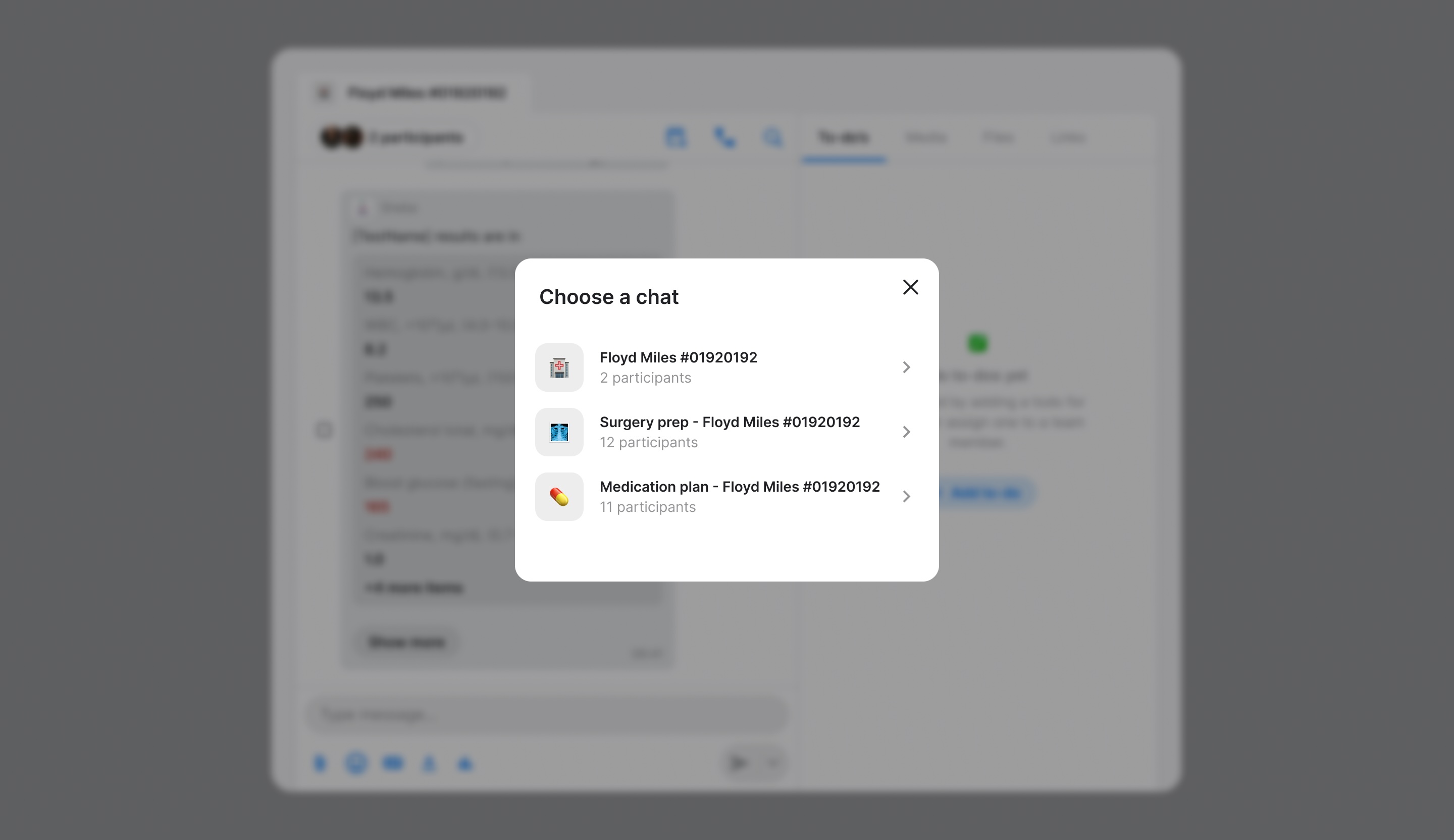
If you use the short external ID and multiple bots have created topics with the same external ID, the user will see a selection screen to choose the correct topic:
Platform availability
Deep linking is currently supported on Web and Windows versions of Zenzap.
Authorizations
Bearer token for the request. Two flavors:
- Static API key — pass your API key (the value returned as
apiKeywhen the bot was created). Must be paired withX-Signature+X-Timestamp(thehmacSignaturescheme). - OAuth access token — pass the JWT returned by
POST /oauth/token. No signature headers are required.
HMAC-SHA256 signature for request verification. Required only when authenticating with a static API key. Omit when using an OAuth access token.
Headers
HMAC signature of the request for authentication and replay protection.
Required only when authenticating with a static API key. If you are using an OAuth access token (issued by POST /oauth/token), omit this header — the JWT carries all the authentication and integrity guarantees.
Replay Protection: The signature includes a timestamp to prevent replay attacks. Requests with timestamps older than 5 minutes are rejected.
The signature payload differs by HTTP method:
- POST/PUT/PATCH/DELETE: HMAC-SHA256 of
{timestamp}.{body} - GET: HMAC-SHA256 of
{timestamp}.{uri}
The signature is calculated as:
- Get the current Unix timestamp in milliseconds
- Determine the payload:
- For POST/PUT/PATCH/DELETE: Use
{timestamp}.{body}where body is the request body - For GET: Use
{timestamp}.{uri}where uri is the full request URI (e.g.,/v2/members?limit=10)
- For POST/PUT/PATCH/DELETE: Use
- Calculate HMAC-SHA256 of the combined payload using your API secret
- Hex-encode the output
- Include the timestamp in the
X-Timestampheader
Example for GET request to /v2/members?limit=10:
Example for POST request with body {"topicId":"123","text":"Hello"}:
For multipart/form-data requests, sign the exact raw request body bytes
(including boundaries and file bytes) as transmitted.
^[a-f0-9]{64}$"a3d5f8e7c2b1d4f6a8e9c7b5d3f1a2e4b6c8d0f2e4a6b8c0d2e4f6a8b0c2d4e6"
Unix timestamp in milliseconds when the request was created. Used for replay protection — requests older than 5 minutes are rejected.
Required only when authenticating with a static API key. Omit when using an OAuth access token.
1699564800000
Path Parameters
The external ID of the topic to retrieve
100Response
Topic details retrieved successfully
The topic ID
"550e8400-e29b-41d4-a716-446655440000"
The topic name
"Project Updates"
The topic description
"Discussion for project milestones"
Array of member IDs in the topic
Array of label IDs on the topic